In this post, we’ll walk through how to enable OpenID Connect (OIDC) authentication in Proxmox using your Google account. By linking your Google account to Proxmox, you offload authentication to a hardened identity provider with MFA while maintaining fine-grained control over access.
What we’ll be doing
Proxmox VE uses a role-based access control system. By default, the root account handles everything—but that’s risky. Instead, we’ll:
- Register and configure an OAuth client with Google
- Configure a Realm in Proxmox to leverage Google as an Identity Provider (IDP) for authentication
- Maintain authorizations through Proxmox’s built-in roles and groups
Step 1: Register Proxmox with Google
To allow Proxmox to delegate authentication to Google, you’ll need to register an OAuth client.
- Go to Google Cloud Console.
- Create or select a project. I’m calling mine “Proxmox Auth”
- Navigate to APIs & Services → Credentials.
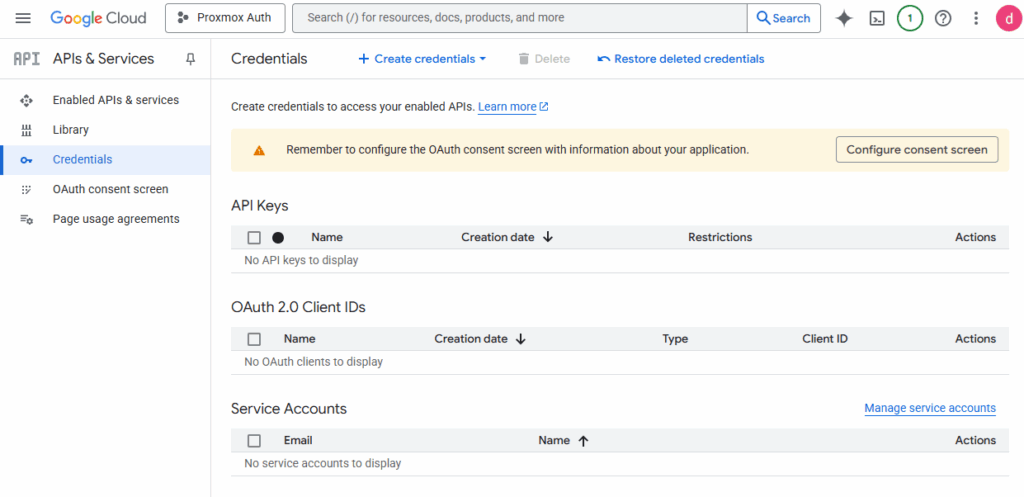
- Click Create Credentials → OAuth Client ID.
- Application type: Web Application
- Authorized redirect URI:
https://<your-proxmox-host>:8006
- Save the Client ID and Client Secret somewhere secure like a password manager. You’ll need it to complete configuration activities.
Step 2: Enable OIDC in Proxmox
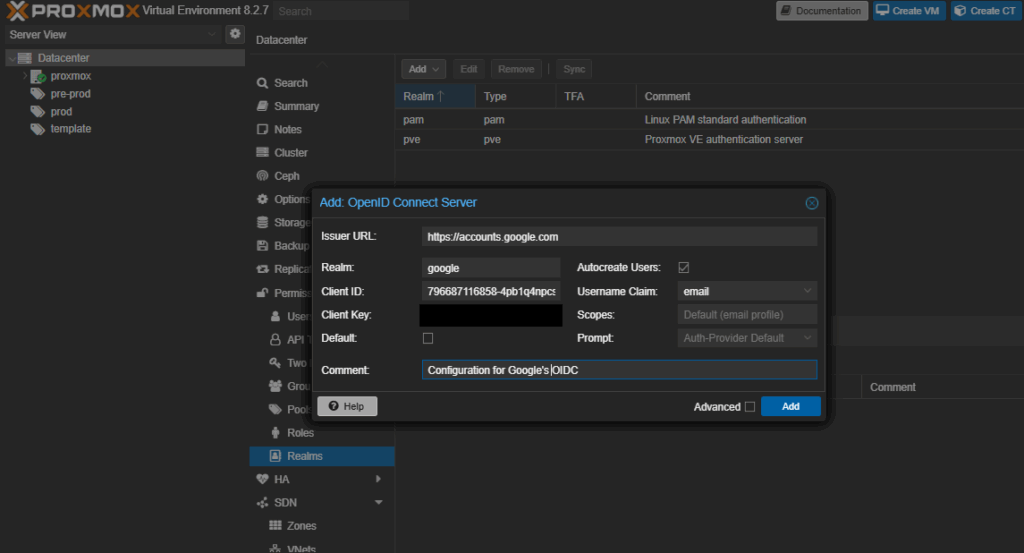
- Go to Datacenter → Permissions → Realms
- Click Add → OIDC
- Use these settings:
- Realm:
google - Issuer URL:
https://accounts.google.com - Username Claim:
email
- Realm:
Step 3: Create a Proxmox User for Your Google Account
Even with authentication delegated to Google, Proxmox still handles authorizations (aka entitelments). You must explicitly define users and roles. If you’re running a home lab you likely want to give yourself admin access.
pveum aclmod / -user you@gmail.com@google -role PVEAdminStep 4: Log In
- Navigate to your Proxmox web UI.
- From the Realm dropdown, select
google. - Enter your Gmail address.
- You’ll be redirected to Google. Once authenticated, you’ll land back into Proxmox.
Security Considerations
- Only users explicitly defined in Proxmox will have access—even if they authenticate with Google.
- Google’s 2FA/MFA applies, improving authentication security.
- Anyone with a Google account could authenticate, however authorizations are only managed within Proxmox role and group assignments.